How to see all your Jira worklogs in one place
Jira has no screen that lists your worklogs across issues. Here are the native workarounds, their limits, and a calendar that shows your whole week.
On this page
Jira has no screen that shows all your worklogs in one place. Every entry lives on the issue where you logged it, in that issue’s Work log tab, and nothing built in answers the question you actually have on Friday: what did I log this week, where did it go, and what’s missing. The closest native moves each cover a corner. A JQL search lists the issues you logged time on. The built-in time tracking report sums a single project. An export turns your history into a spreadsheet.
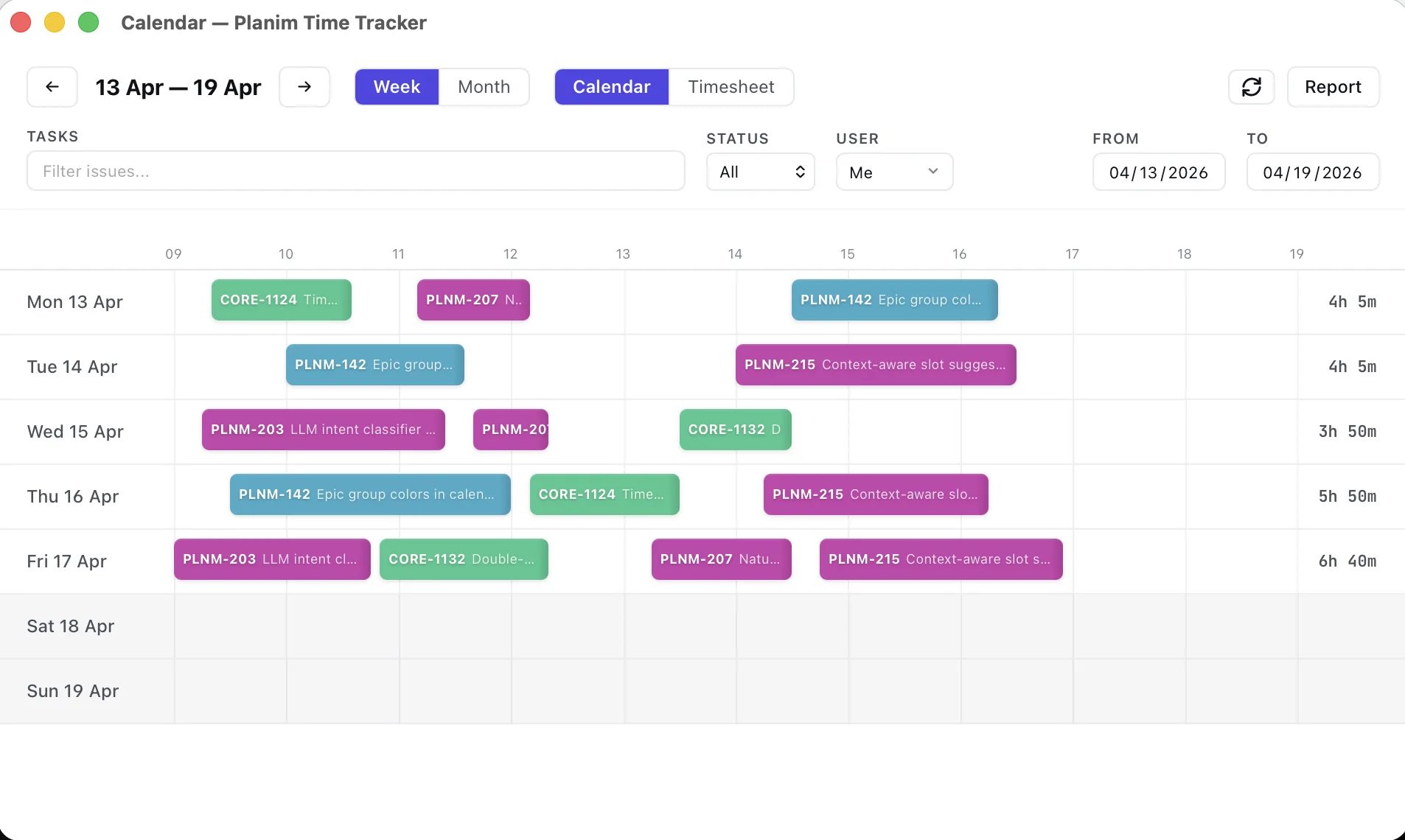
The screen Jira is missing is a calendar of your worklogs, and that is the screen we built Planim Time around: connect it to your Jira and the week appears as blocks on a time grid, every entry at its start time, sized to its duration, ready to be fixed by dragging. Below is what you can get out of Jira itself first, because sometimes a JQL line is all you need, and then what the calendar changes.
How far you get inside Jira
The Work log tab on each issue shows every entry logged there, with authors and durations. It is the right place to check a single entry and the wrong place to reconstruct your week, because your week is scattered across every issue you touched.
One JQL line comes close:
worklogAuthor = currentUser() AND worklogDate >= startOfWeek()
Run that and Jira lists each issue you logged time on this week. Genuinely useful for jogging your memory. But JQL returns issues, not worklogs: no durations, no start times, no total. It locates your week; it cannot show it.
The built-in report aggregates estimates and logged time for a single project, so working across two projects already means stitching numbers together by hand. Our reports post covers where the built-ins stop. And when you need every entry out, exports and the API will produce a spreadsheet, the right tool for invoicing or archiving and a heavy one for “does my Tuesday look right”.
Each route answers a different question. None of them shows you the week.
Your week, as a calendar
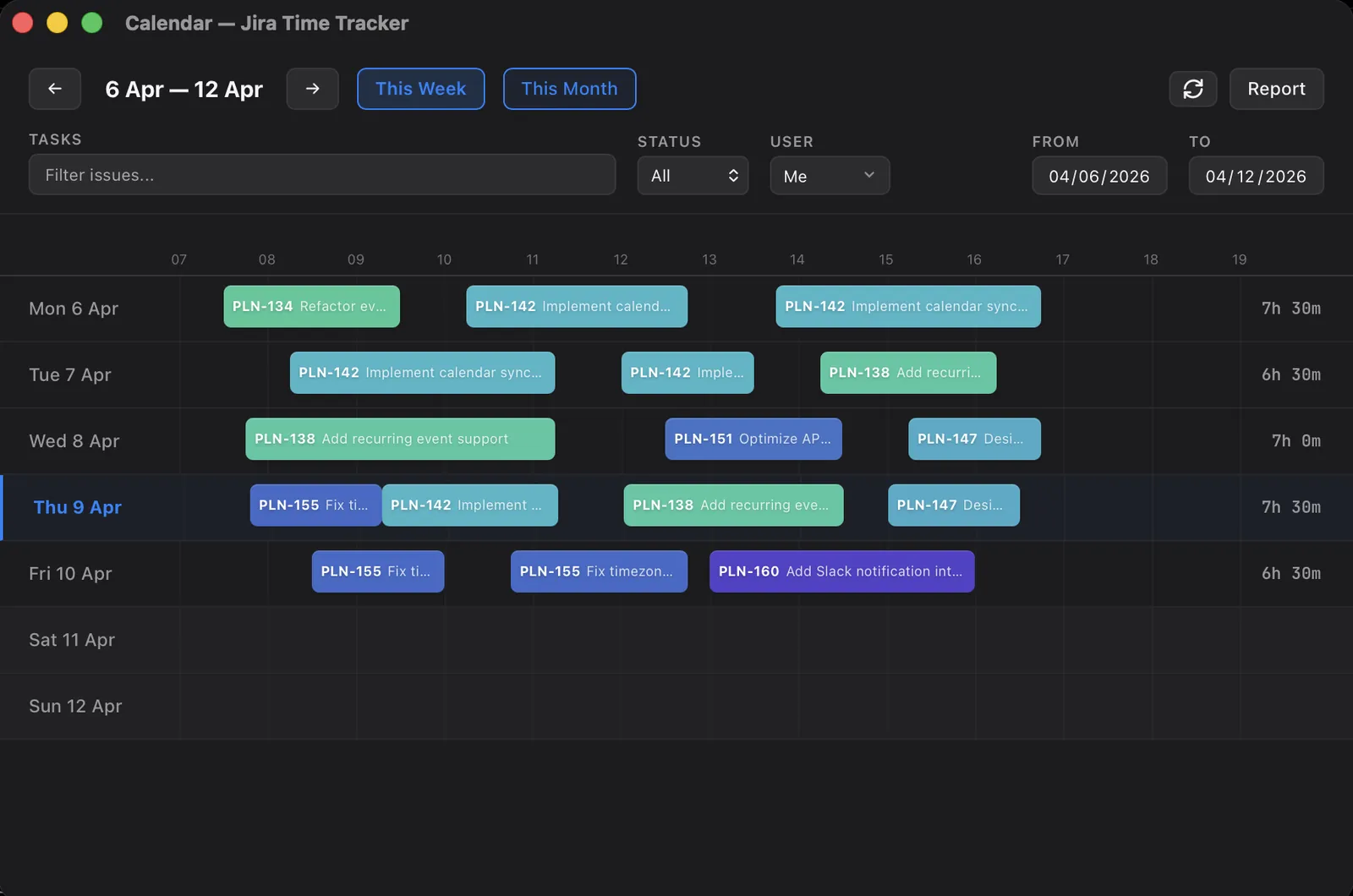
Open Planim Time’s calendar instead. Every worklog you authored is a block: it sits at the time the work started, its height is the duration, and it carries the issue key. Monday stops being a query result and starts looking like a day. The 9:30 block on PAY-214, the meeting-shaped gap after lunch, the suspiciously empty Thursday afternoon.
You don’t start from a blank grid. Connect, open a week, and it fills in with what you already logged, and not just entries made through Planim Time: hours logged in Jira’s own dialog, from a script, or from your other laptop all land on the same grid, because to Jira they are all simply your worklogs. Any week you open fills in the same way, this one or last March.
Two details make the week readable rather than merely visible. Worklogs your teammates logged on shared issues show up as read-only context, so a shared issue’s day makes sense instead of looking half-empty. And overlapping entries sit side by side in parallel lanes instead of stacking behind each other, which means double-logged time, the classic silent timesheet bug, is visible the moment the week loads.
Every time we watch someone open a full week for the first time, the same thing happens: they find a mistake inside a minute. A block on the wrong day, two entries covering the same hour, a day that adds up to eleven hours. Not because people are careless, but because until now nothing ever showed them the shape of their week.
Seeing it is half the job. Fixing it is a drag.
The block you’re staring at is editable in place. A worklog on the wrong day gets dragged where it belongs, across days if needed. A wrong duration is the edge of the block, pulled; edits snap to the minute, and the day’s total updates as you drag. Time logged against the wrong issue, the correction Jira famously has no button for, is a click here: open the block, pick the right task, confirm. Comments are edited the same way, and a block that shouldn’t exist at all is deleted from the same place.
Changes to entries already in Jira are written back through your own Jira account as you make them, so what the calendar shows is what Jira stores. The full mechanics, including permissions, are in our guide to changing logged hours; the short version is that a correction takes seconds instead of a form per issue.
And since something is usually missing too, the grid works in the other direction: click an empty stretch and drop the forgotten hour where it happened. Reconstructing a whole lost day is its own discipline; the backfill guide covers it.
If you think in totals: the timesheet
Some corrections are not “move this block” but “Tuesday should say 6, not 4”. For that the same data flips into a timesheet: issues down the side, days across, your week as numbers. Click a cell and type. 1.5, 90m, and 1h30m all work.
The calendar answers “when did I work on this”, the timesheet answers “how much did this get” (we’ve written about which model fits which day), and switching between them is one click on the same screen. When an invoice or a monthly report is due, the month view puts the whole period in front of you the same way.
The Friday habit
The real change is that “check my logged time” becomes something you actually do, because it costs a glance instead of a JQL session and twelve open issues. Open the week, spot what’s off, drag it right, add what’s missing, done before the standup ends.
Jira hasn’t grown this screen in over twenty years of per-issue worklogs, and its own report still stops at project totals. Download Planim Time, point it at your Jira, and look at last week. It’s already on the calendar, waiting, mistakes and all.