What did I work on? Rebuilding Jira worklogs from your own activity
Jira already records what you touched: assignments, comments, status changes. Here is how to turn that activity trail back into honest worklogs.
On this page
It is Friday, the week is half logged, and Tuesday is a blank. You don’t remember the order you did things in, let alone the hours. Here is the part most people miss: you don’t have to remember, because Jira already wrote it down. Every issue you were assigned, reported, commented on, or moved across the board left a timestamped record. The work of reconstruction is reading that record back, not interrogating your memory.
The honest framing first: activity tells you which issues and roughly when. It never tells you how long. That gap is the whole job, and pretending otherwise is how reconstructed logs start to read as fiction. What follows is the method, staying inside Jira’s own records; for evidence that lives outside Jira (git commits, calendar blocks, Slack threads), see the backfill guide. The tool that automates it, Recent Work in Planim Time, is kept to one section near the end.
What Jira actually remembers
Jira has no “what did I do today” screen, which is why this feels harder than it is. The data is there, spread across four trails, and each one answers a slightly different question.
Assignment. Issues where you are the assignee. The weakest signal on its own, because an issue can sit assigned to you for a month without you touching it, but combined with a recent updated date it is a strong hint you worked on it.
Authorship. Issues you created or reported. These cluster around the moments you were triaging, filing bugs, or breaking down a task. A burst of created issues on Wednesday morning is usually half an hour of planning you would otherwise forget.
Comments. Every comment you left is timestamped to the minute. This is often the richest trail for engineers, because the issues you commented on but were never assigned, a review here, a question there, are exactly the ones that vanish from memory first.
The changelog. Every field you changed, every status transition you made, is recorded in the issue’s history with your name and a timestamp. Moving an issue from In Progress to In Review at 15:40 is a near-certain marker that you were working on it just before.
Read together, these four trails reconstruct a day with surprising fidelity. Not the hours. The shape: which issues, in what order, around what time.
The one thing it never records
Jira records events, not durations. It knows you commented on PROJ-412 at 10:42 and moved it to In Review at 11:30. It does not know whether those forty-eight minutes were spent on PROJ-412 or on a Slack thread and a coffee with the bug still open in a tab.
People reach for Time in Status here and get burned. Time in Status measures how long an issue sat in a state, wall-clock, across everyone. An issue can spend three days In Progress while you touched it for two hours. It is a useful flow metric and a terrible proxy for personal effort.
So duration stays a human judgment. The trick is to make that judgment cheap and bounded, which is the last section. Everything before it is just narrowing the guess down from “the whole day” to “this issue, around this hour.”
The query that finds your week
The JQL to start from is:
(assignee = currentUser()
  OR reporter = currentUser()
  OR worklogAuthor = currentUser()
  OR watcher = currentUser())
AND updated >= -7d
ORDER BY updated DESC
Two parts of it are worth explaining, because they are the difference between a clean list and a noisy one.
The watcher = currentUser() clause is doing more work than it looks. Jira autowatches any issue you comment on, with autowatch on by default for most accounts. That means watching is a free side effect of participating, and a watcher filter quietly pulls in every comment-only issue without a second search against comment bodies. An early version of Recent Work in Planim Time ran a query like this, and the watcher clause was what turned the list from “issues I own” into “issues I actually touched.” It has one hole: updated is the issue’s last change by anyone, so an issue a teammate edits on Thursday drops out of your Tuesday search. The app now selects with issueKey IN updatedBy(you, from, to), which matches the time of your own update, and then reads the changelog and comments for your events; if you run the query by hand, updatedBy() is the more forgiving form. Either way, the app does the next step for you: each touched issue lands on the calendar near its timestamp; Add drops it there as a draft once you set the duration, and Push sends it (Pro).
The second part is what you throw away. If you expand the changelog on each returned issue, you will find histories that contain nothing but worklog and estimate field changes. Those are the record of you logging work, not of you doing it. Keep them and the tool starts suggesting that you log the act of logging. Filter any history whose every item is a time-tracking field, and what remains is real activity: status moves, comments, summary edits, links.
If you want the full mechanics of running JQL like this against the API and reading the changelog out of the response, the Jira worklog REST API guide has the request shapes. For doing it by hand from the issue view, how to log work in Jira covers the dialog.
Turning touches into worklogs without inflating the day
Here is the failure mode of activity-based reconstruction, and it is the opposite of the one most people worry about. You won’t under-log. You will over-log. A day has thirty timestamped touches across eleven issues, you give each a “reasonable” thirty minutes, and the day sums to fifteen hours. Now your log is wrong in the embarrassing direction.
The counterweight is a capacity ceiling. Decide the day was eight hours before you start assigning durations, and treat that as a budget you are spending down, not a target you are filling. When the issues you are confident about already account for seven hours, the remaining touches were minutes, not half-hours. This is the same discipline as the by-hand backfill post, where the rule is to log at the issue level and add the hours up afterward, rather than deciding the day was nine hours and slicing it.
Two habits keep the result defensible. Round to fifteen or thirty minutes, because no reconstruction is precise to the minute and false precision invites exactly the scrutiny you are trying to avoid. And write one sentence per worklog. “Reviewed the rate-limiter PR and paired on the fix” costs five seconds now and saves your future self the entire reconstruction next quarter.
Where the product fits
Everything above is doable by hand: run the JQL, open the changelog, place the issues, assign durations under a ceiling. It is also tedious enough that most people skip it and guess, which is the actual problem.
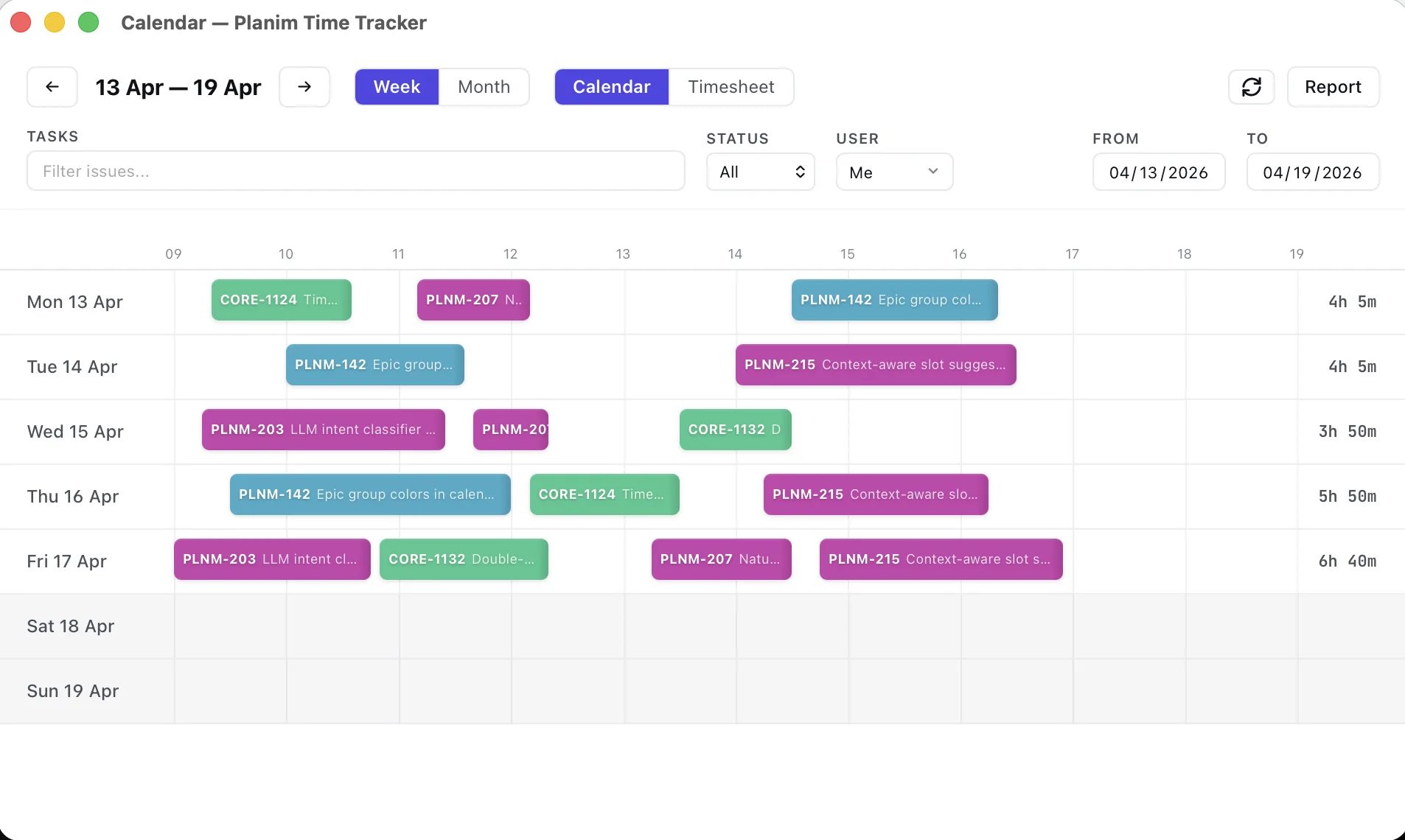
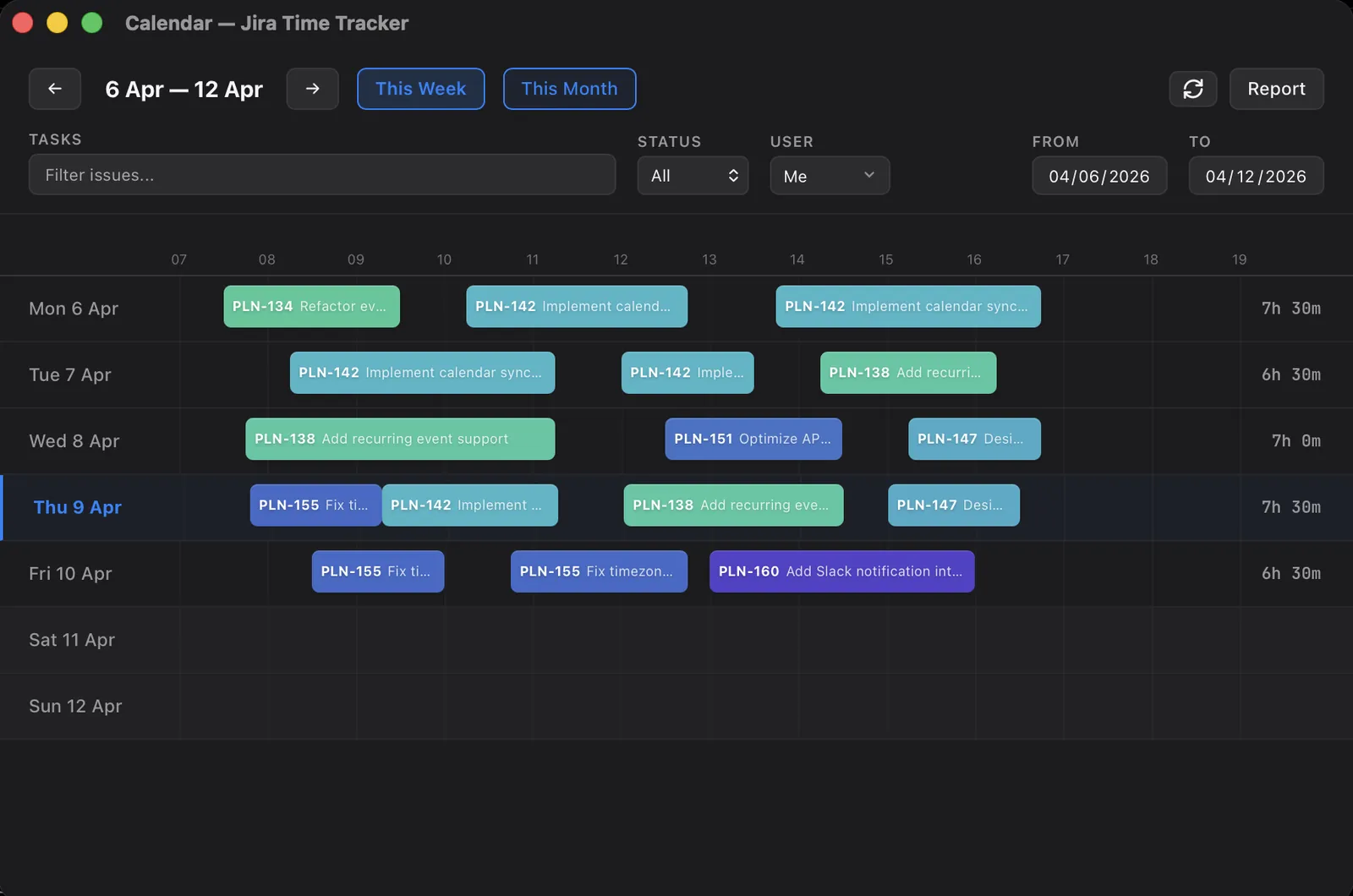
In Planim Time this is the Recent Work panel next to the calendar. It runs the updatedBy() search for the day or week you are looking at, keeps your comments, status moves, field edits, and created issues, drops the worklog-only noise, and shows each issue as a block on the calendar near the time you touched it. The proposed duration is the span of your traces inside that work session, marked with a confidence level; a batch of tickets you swept through in one status change becomes a candidate without a duration instead of an invented one. You correct durations against a daily capacity bar that fills as you go, hit Add all for the ones you are sure of, and push. It is the same method, with the JQL and the changelog parsing done for you (Pro, 14-day trial on first launch). It is the idea behind signals from the work, not from the worker: the suggestions come from your Jira history, not from watching your keyboard.
The honest limit is the same as the manual version. The app can place PROJ-412 on Tuesday at eleven and tell you that you commented and moved it to review. It cannot tell you the twenty minutes versus the ninety. That number is yours, and it should be.
A short version
If you have opened Jira and Tuesday is blank:
- Run the activity query for the period you are rebuilding:
currentUser()across assignee, reporter, worklogAuthor, and watcher, ordered byupdated. - Keep the issues with real touches, status moves, comments, and field edits. Drop the ones whose only change was a worklog.
- Place each issue on the day near its changelog or comment timestamp, not by guessing the order.
- Assign rounded durations against a fixed daily ceiling so a pile of small touches cannot inflate the total.
- Add a one-line comment to each entry and push it with the right started date.
The reason this beats memory is not that it is faster, though it is. It is that the activity trail is evidence you can point at when someone asks where an hour went, and a week reconstructed from evidence is a week you can defend.